Ports
The Gateway works with two separate port spaces. Confusing them is the root of most "but the port is right there" problems.
| Local ports | Room ports | |
|---|---|---|
| Prefix | always 10 |
the room number |
| Example (room 11, channel 0) | 10009 |
11009 |
| Used for | your own tools ↔ the Gateway | the Gateway ↔ the router's proxies |
| Shown in the interface | yes | no |
| Changes when you join another room | no | yes |
You only ever need local ports. They are the ones the panels show, and the ones you put into a Max patch or an OSC tool.
Room ports are derived by every peer from the room number and channel, so they never have to be communicated — which is why they are not displayed.
Why local ports are fixed at 10xxxx
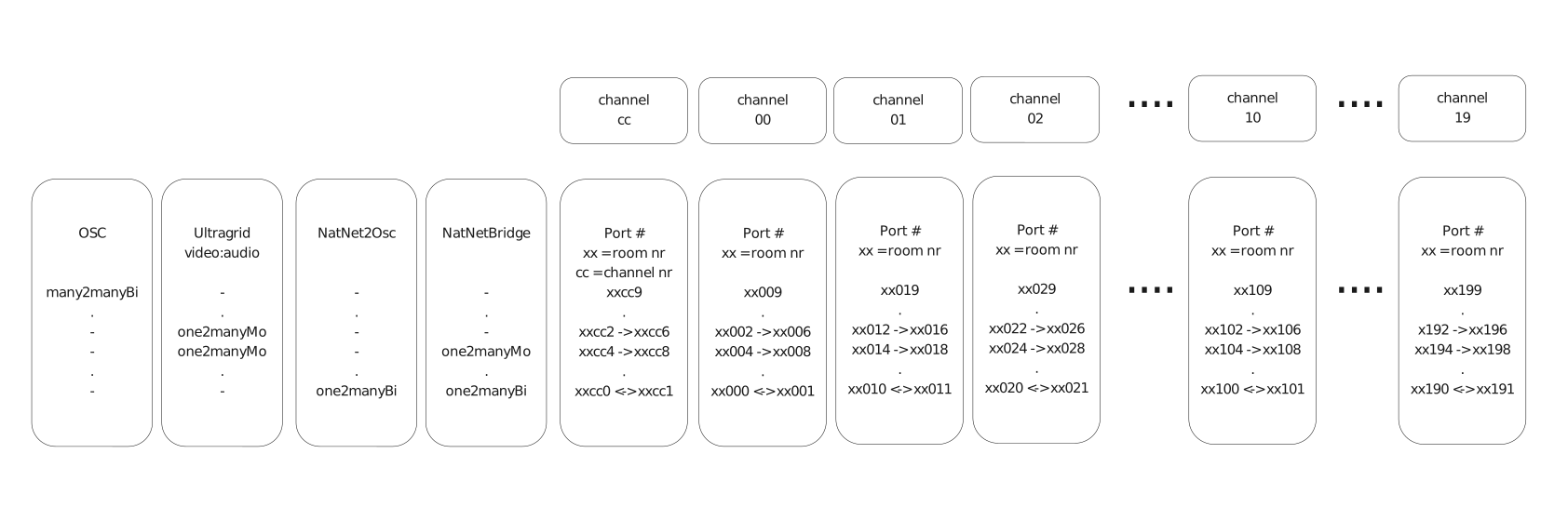
So that rejoining a different room does not break your setup. Channel 1's
local OSC input is 10019 in every room, forever. If local ports followed
the room number, every patch would break the moment you moved rooms.
How a port is built
- prefix —
10for local ports, the room number for room ports - channel — 0–19
- slot — which stream within the channel
So room 11, channel 5, slot 9 is 11059; the local equivalent is 10059.
Slots by device type
| Device | Slot | Carries |
|---|---|---|
| OSC / Stage Control | +7 | output 2 |
| +8 | output 1 | |
| +9 | input | |
| UltraGrid | +2 | video (send) |
| +4 | audio (send) | |
| +6 | video (receive) | |
| +8 | audio (receive) | |
| MoCap | +0 | to the router |
| +1 | from the router | |
| Motive bridge | +0 | NatNet command channel |
| +2 | data, Source → router | |
| +6 | data, router → Sink |
Stage Control additionally uses one port per room for the web interface
itself: roomId × 1000 + 902 — 11902 for room 11.
Worked example
Room 11, channel 3, an OSC device:
| Local input — send your OSC here | 10039 |
| Local output 1 — where received OSC is forwarded | your chosen address |
| Room input, peer → proxy | 11039 |
| Room output, proxy → peer | 11038 |
The room's range
Each room gets a 1000-port range on the router: room 11 gets 11000–11999. Only the first 200 are used, which is what bounds a room to 20 channels.
Firewall rules
If you have to write firewall rules rather than answer a prompt, what needs to pass is:
- outbound UDP to the router on that room's range
- inbound UDP on your local
10xxxports, for the return traffic
The Gateway itself also needs outbound TCP to the broker port, 3883 by default.
Media is UDP throughout and never passes through the broker. That is why a broker outage costs you control but not streams.