OSC
Carries OSC messages between the peers in a room. Everyone with an OSC device on the same channel sees everyone else's messages.
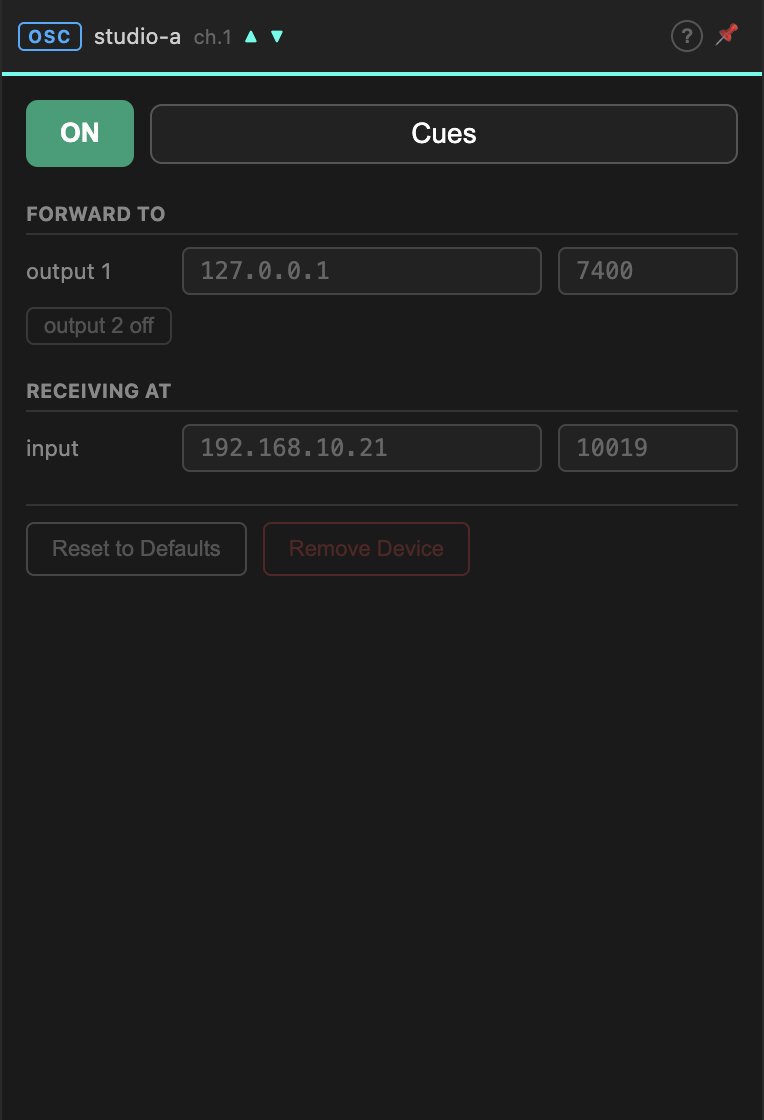
The panel has two halves, and the thing to hold on to is that they describe your machine, not the far end. You never configure the other peers — they configure themselves.
Forward to
Where this device sends the OSC it receives from the room.
| Field | |
|---|---|
| output 1 | IP address and port on your LAN. 127.0.0.1 for something on this machine. |
| output 2 | An optional second destination. Press output 2 off to enable it. |
Point these at whatever should react to remote OSC — a Max patch, a QLab machine, a lighting desk.
Two outputs are useful when the same cues must reach two places: your own machine and a console elsewhere in the building.
Receiving at
Where this device listens for OSC from your tools, to forward into the room. Both fields are read-only: the IP is the NetworkCard you chose at connect time, and the port is allocated by the Gateway.
Send OSC to that address and port, and every peer with an OSC device on this channel receives it.
The port is stable across rooms
Local ports depend only on the channel number, never on the room. Channel 1 is port 10019 whether you are in room 11 or room 27, so a Max patch built against it keeps working when you rejoin somewhere else.
Room-side ports do change with the room, but you never need those — every peer works them out locally.
Switching it on
Press ON. The arrows in the matrix light up when data moves; the panel header shows ▲ for outgoing and ▼ for incoming activity.
While the device is on its settings are locked. Switch off to change a port.
Reset to Defaults restores the allocated ports and clears the output addresses.
OSC is really lists
Messages travel over MQTT as strings, not as OSC packets. The Gateway serialises on the way out and deserialises on the way in.
In practice this is invisible — in Max there is no difference between a list and an OSC message. It matters in two places:
- Type tags are not preserved. Values arrive as their textual form.
- Blobs and bundles do not survive. Send them as separate messages.
Troubleshooting
| Symptom | Likely cause |
|---|---|
| Nothing arrives at output 1 | Nothing is being sent on this channel, or the far end's device is off. Check the other peers' cells in the matrix. |
| Your tool's OSC never leaves | Sending to the wrong address — use the Receiving at address, not localhost, unless your tool is on this machine. |
| Arrows stay dim on both ends | Firewall. See the FAQ. |
| Messages arrive duplicated | Two OSC devices on the same channel forwarding to the same destination. |